
In this article
I found a bug on my own site that hid 87 of 108 pages from search engines. The site looked normal in a browser the entire time.
You've probably shipped something that looks fine and still gets ignored by crawlers.
This piece walks through that fix, plus four more failures pulled straight from mangabeira.net's live stack, not a generic audit.
You'll get the rendering bug, the AI-crawler allowlist, and the schema rules that keep live data from going stale. My guide to web3 SEO covers the rest of the cluster.
What Web3 Technical SEO Means
Web3 technical SEO makes a crypto site's content readable, indexable, and citable by search engines and AI crawlers. Most Web3 frontends are client-side apps with wallet connections and live on-chain data. Standard SEO tooling was never built for that.
Four things matter most. Whether crawlers can render your pages. Whether your content lives in one place, or scatters across a marketing site, an app, and a docs subdomain.
Whether your data carries machine-readable markup. And whether you've told crawlers, AI ones included, what they're allowed to do with what they find.
Standard technical SEO assumes a static site with a handful of crawlers to think about. Web3 adds three pressures: client-side rendering, live data that changes by the block, and AI crawlers that behave nothing like Googlebot.
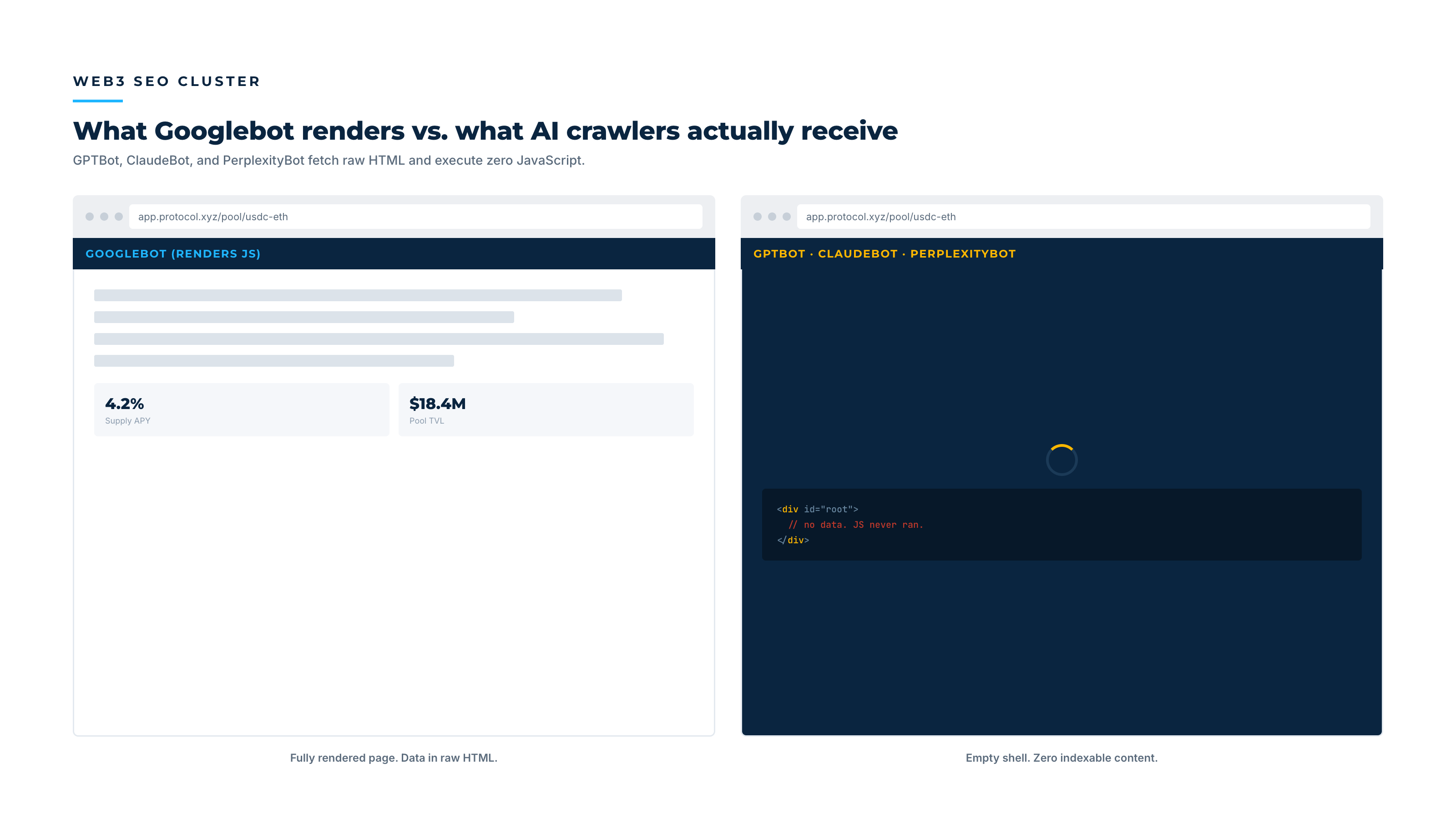
The Rendering Problem: What Googlebot Sees vs. What AI Crawlers See
Googlebot renders JavaScript. It queues your page, executes the JS, and indexes what it sees. That's slower than static HTML, but it works.
GPTBot and ClaudeBot don't. They fetch raw HTML and execute zero JavaScript.
If your content only exists after a client-side render, these crawlers see an empty shell. That's true no matter how good the page looks in a browser.
I found this exact failure on my own site on 2026-08-02. I was auditing a claim from a LinkedIn post about a different project's rendering bug. The audit turned into a mirror.
mangabeira.net runs a Cloudflare Worker that serves rendered snapshots to known crawlers, including Googlebot, GPTBot, ClaudeBot, and PerplexityBot. It fires when a request sends an Accept: text/html header. Tested against all 108 sitemap URLs, every route passed: correct titles, canonicals, and full JSON-LD.
The response header confirmed it: x-render-source: cf-worker-snapshot.
Where the actual bug was hiding
The Worker was masking a defect in the origin build. vite.config.ts never called loadEnv(), so the Node-side prerender script read process.env.VITE_SUPABASE_URL, always undefined at build time. The Supabase fetch silently failed, the article list came back empty, and 87 of 108 sitemap routes fell back to the homepage shell at origin. The build passed green the whole time, quietly producing an incomplete site on every deploy.
A browser check will never catch that. The bug stayed invisible because the Worker intercepted crawler traffic before it reached the broken build. The broken build remained the system's single point of failure.
If the Worker misconfigured, or a new crawler UA slipped past its allowlist, that crawler would hit the broken build. It would see a homepage with the wrong title on 87 different URLs.
The fix, shipped 2026-08-05, was two lines. I merged loadEnv(mode, process.cwd(), "") into process.env before the Vite plugins array builds. I verified it with a fresh clone: prerender count went from 20 of 108 pages to 108 of 108.
A mitigation layer is not the same thing as a fix. The Worker was correct engineering. But it let a real defect survive undetected for months, because it never failed loudly.
If your site is a single-page app, check two things. Does your prerender step run against production environment variables? And does your fallback layer, if you have one, fail loudly when the origin it protects breaks?
Site Architecture: Marketing Site, App, and Docs Subdomain
Most Web3 projects split into at least three surfaces: a marketing site (project.xyz), an application (app.project.xyz), and documentation (docs.project.xyz). Search engines treat subdomains as related but distinct properties, so link authority, relevance, and crawl budget all divide across three crawl graphs instead of one.
I see this pattern constantly in protocol audits. One subdomain ends up ranking instead of the one a team actually wants to win.
Merging subdomains isn't always the fix. That's a large infrastructure decision with real tradeoffs.
The real fix is an explicit choice. Decide which subdomain should rank for which query, cross-link deliberately, and point canonical tags at the surface you want to win.
Watch Out For
A docs subdomain often outranks the marketing site for the exact terms marketing wanted to own, because docs pages are static and text-dense while the marketing site is a heavier client-side app. That split needs to be a deliberate choice, not an accident.
The app frontend itself, behind the wallet-connect flow, is a different problem: gated content, dynamic per-address routes, session-dependent state. I don't cover that depth here on purpose. It deserves its own resource.
Schema for Web3: Structuring Content and Live Data
Schema markup (JSON-LD) tells search engines and AI systems what a page is, not just what it says. Three types cover most of what matters: Article for editorial content, FAQPage for Q&A sections, and Organization for the entity behind the site.
This article carries all three. The FAQ below is marked up as FAQPage schema, not just a styled list.
The part specific to Web3 is live data. A page showing a token's price, TVL, or holder count is only accurate for a moment.
Without a timestamp, a crawler or an AI model has no way to know if the numbers are current. They could be six months stale.
Two rules fix that. Mark every data-driven page with a visible "last updated" date near the content, not buried in a footer. Update dateModified every time the underlying data changes, not just when you edit the surrounding copy.
Key Insight
To a machine, a token-data page with no freshness signal is the same as a page with no date at all. Freshness has to be declared, not assumed.
Crawl and Index Control: robots.txt, AI-Bot Allowlists, and Content-Signal
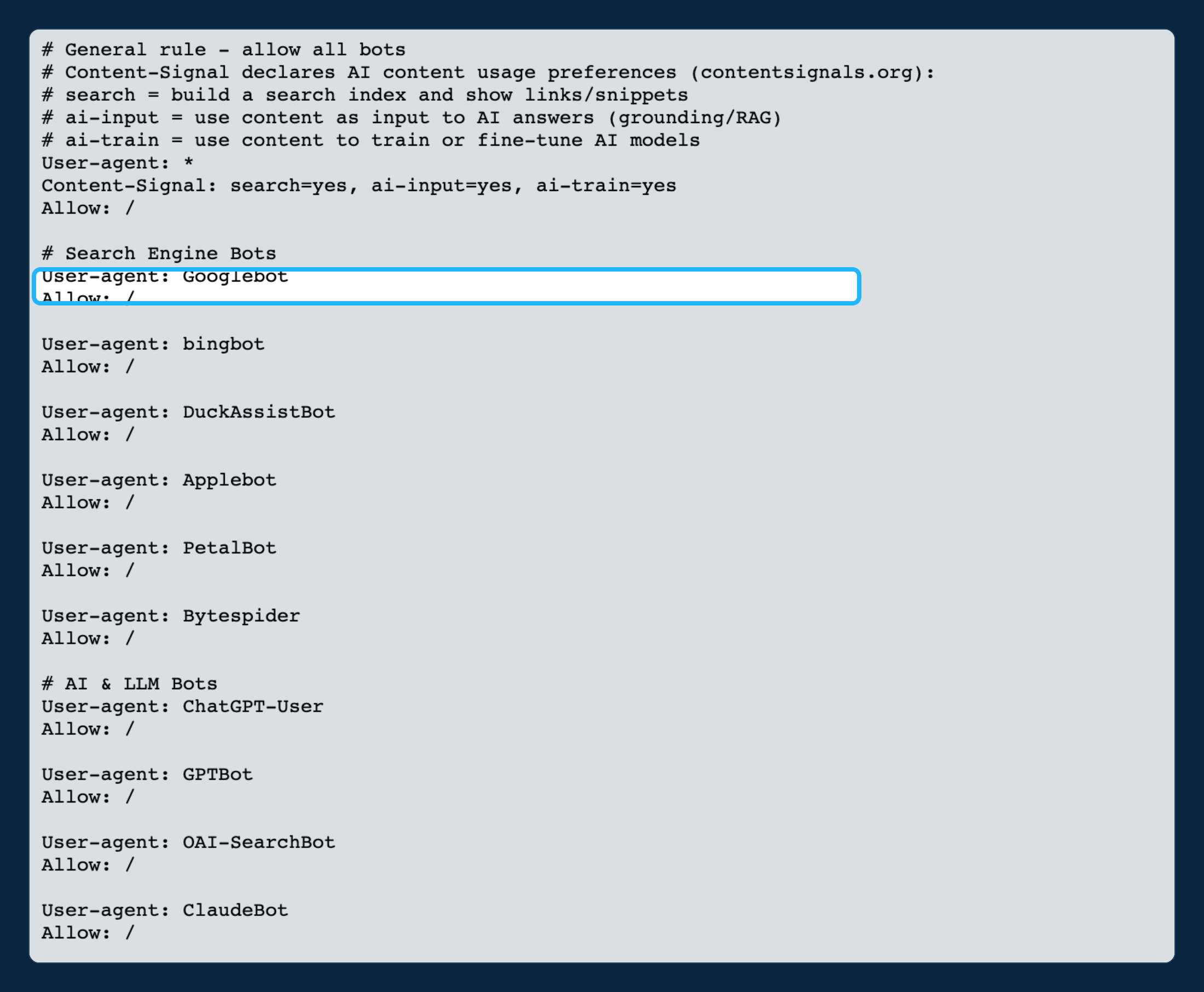
Robots.txt does two jobs. It tells crawlers what they can access. Increasingly, it also tells AI crawlers what they're allowed to do with what they find.
Most projects get the first job wrong by accident. They inherit a template that blocks staging paths, and catches /docs or /whitepaper along with it. Check yours against your actual live routes, and don't assume it's correct just because it shipped with the framework.
The second job is newer, and most sites haven't touched it. On 2026-08-31, I added Content-Signal: search=yes, ai-input=yes, ai-train=yes to mangabeira.net's robots.txt under User-agent: *, using the emerging contentsignals.org standard.
ai-train=yes was a deliberate, non-default choice. It opens the site fully to AI training, on top of AI input and search indexing. That decision should follow your own citation strategy, not get made by omission.
Two things I checked and skipped, because "do less" is sometimes the right call. Link response headers for an agent-facing resource: none exist yet. DNS-AID records: those require DNSSEC, which the zone lacks.
Infrastructure for a standard nobody reads isn't technical SEO. It's noise that looks like diligence.
| Robots.txt element | What it controls | Common Web3 mistake |
|---|---|---|
Disallow rules |
Which paths crawlers may fetch at all | Inherited template blocks /docs or /whitepaper by accident |
| Named AI bot rules (GPTBot, ClaudeBot, PerplexityBot) | Whether AI crawlers can fetch the site at all | Blocked without review, killing AI-answer citation before it starts |
Content-Signal |
What crawlers may do with fetched content (search, AI input, AI training) | Not declared at all, leaving usage preferences implicit |
Performance on Wallet-Heavy Frontends
Core Web Vitals are a Google ranking signal. Wallet connect flows hurt all three. Heavy JavaScript bundles for wallet SDKs slow largest contentful paint.
Connect modals without reserved layout space cause layout shift. Wallet event handlers on the main thread block interaction to next paint. I don't go deep into fixing that here, since it's a dApp-frontend problem more than a site-wide one.
Here's the site-wide framing. If your marketing pages share a JavaScript bundle with your app, wallet SDK weight taxes pages that never touch a wallet. The fix is below.
Best Practice
Split the bundle so marketing and content pages load without wallet dependencies. A crawler waiting on code it doesn't need is a technical SEO fix, not just a performance one.
FAQ
What is web3 technical SEO?
Web3 technical SEO makes a crypto site's content readable and indexable by search engines and AI crawlers. It accounts for client-side rendering, split subdomains, live on-chain data that needs freshness signals, and explicit crawler permissions through robots.txt and Content-Signal declarations.
Why don't AI crawlers see the same page Googlebot sees?
Googlebot executes JavaScript before indexing a page. GPTBot, ClaudeBot, and most other AI crawlers fetch raw HTML and run no JavaScript. A client-side app can look complete in a browser and still be empty to these crawlers, unless content exists in the initial response.
Do I need a Cloudflare Worker to fix AI crawler rendering?
A Worker that serves pre-rendered snapshots to known crawlers is one working pattern, and it's what mangabeira.net runs. But it's a mitigation layer, not a substitute for a build that prerenders correctly at the origin. Treat it as defense in depth, not the primary fix, or a build defect can go undetected for months.
What's the difference between web3 technical SEO and SEO for dApps?
Web3 technical SEO covers the site-wide stack: rendering, subdomain architecture, schema, crawl control, and performance. SEO for dApps is narrower: the application interface itself, wallet-gated content, dynamic per-address routes, and app-subdomain indexing, which needs its own dedicated treatment.
Should I open my robots.txt to AI crawlers?
That depends on your citation strategy, but leaving it undeclared is worse. If you want your project cited in AI-generated answers, GPTBot, ClaudeBot, and PerplexityBot need explicit access. A Content-Signal declaration (search=yes, ai-input=yes, ai-train=yes, or a narrower combination) makes your preference explicit instead of leaving it to each crawler's default behavior.
That's the real lesson: Web3 technical SEO isn't a checklist you clear once. It's a set of assumptions, about env vars, about which crawlers execute JavaScript, about what your robots.txt says. Those assumptions need re-verifying every time the stack changes underneath them.
For the deeper cluster context, the full web3 SEO guide connects this piece back to keyword research, link building, and getting cited in AI Overviews.
Not sure what a crawler actually receives from your site?
That's the first thing I test. My Web3 Growth Audit covers rendering, crawl control, and the schema fixes from this article, run against your live stack.
Learn About the Web3 Growth Audit →